Struggling With Open-Plan Office Noise? Here’s How To Fight Back!

Offices these days can be loaded with an assortment of distractions. From the constant sounds of coworker conversations to the clicking sounds of keyboards, open-plan environments can wreak havoc on your focus and productivity. Just by the sheer nature of their open design, sound is everywhere.  And for those working from home, the sounds of children, barking dogs, or landscapers can also be very disruptive to concentration, especially during crucial voice or video calls. We’ve all been there; you’re in the middle of an important call, when all of a sudden, you get surprised by some unexpected noise which can easily distract you, as well as your caller. Further, you run the risk of compromising your image, and having your message lost in the chaos.

These sounds can be detrimental for anyone who relies on clear audio communication to get their message across. And no doubt you know what I’m referring to or you wouldn’t be reading this blog.

The way it normally goes is the noise pops up at the least convenient times. That’s like those times when presenting to a client and your coworkers talk volume elevates, or when you struggle to silence the sounds of children or pets when working from home.  These distractions not only disrupt your own workflow but can also leave a negative impression on those you’re communicating with. And these days, we need every advantage we can get, whether that’s the advantage of better focus, or instilling a better image to your customers, it all matters.

The impact of these distractions is notable. Studies show that noise can

  • Cause you to be less productive
  • Leave you and your callers frustrated, and annoyed
  • Cause you health issues
  • Leave you with a less than professional image
  • Require as much as 20 minutes to regain your level of focus once distracted

So with all the noise doom and gloom, what can you do if you work in an open-plan office environment, from home, or remotely? 

Yes, you can plead with your Management to silence the noisy ones, or encourage them to install costly noise abatement fixtures such as cubicles, sound absorbing materials on the ceiling and walls, but no doubt that’d be an uphill battle, so good luck with that.

But, before you come to the conclusion that a solution is merely a pipe dream, or a nice, but elusive thought, there is good news: there are effective solutions to combat the distractions of noise and achieve crystal-clear audio for your voice and video calls. And on the begging and pleading scale, it’s doable.

Here are a few things you might consider:

Invest in a Professional Headset:

Ditch the earbuds, cheap headsets, using a speakerphone or low-quality mics. Upgrading to a professional headset specifically designed for business calls offers a significant leap in audio quality. And when your job performance and image are on the line, investing in a professional grade headset makes a lot of sense.

Look for features like:

  • Noise-Canceling Microphone: This feature reduces background noise from your surroundings, ensuring your voice comes through loud and clear. But be aware that not all business headsets come with a microphone that can remove noise well. Some do a better job over others, so you’ll need to do some research. Once you’ve decided on a model, try it out in your office before deciding to purchase it. And if your headset company won’t allow you to try before you buy, then find a company that will.

You may find microphones labeled non-noise canceling, noise canceling, ultra-noise canceling, omni-directional, uni-directional and the list goes on. The main thing is to make sure that the headset you acquire provides you with professional sound quality, and high level noise reduction, such as the Orosound Tilde Pro, which is an excellent choice with incredible sound quality.
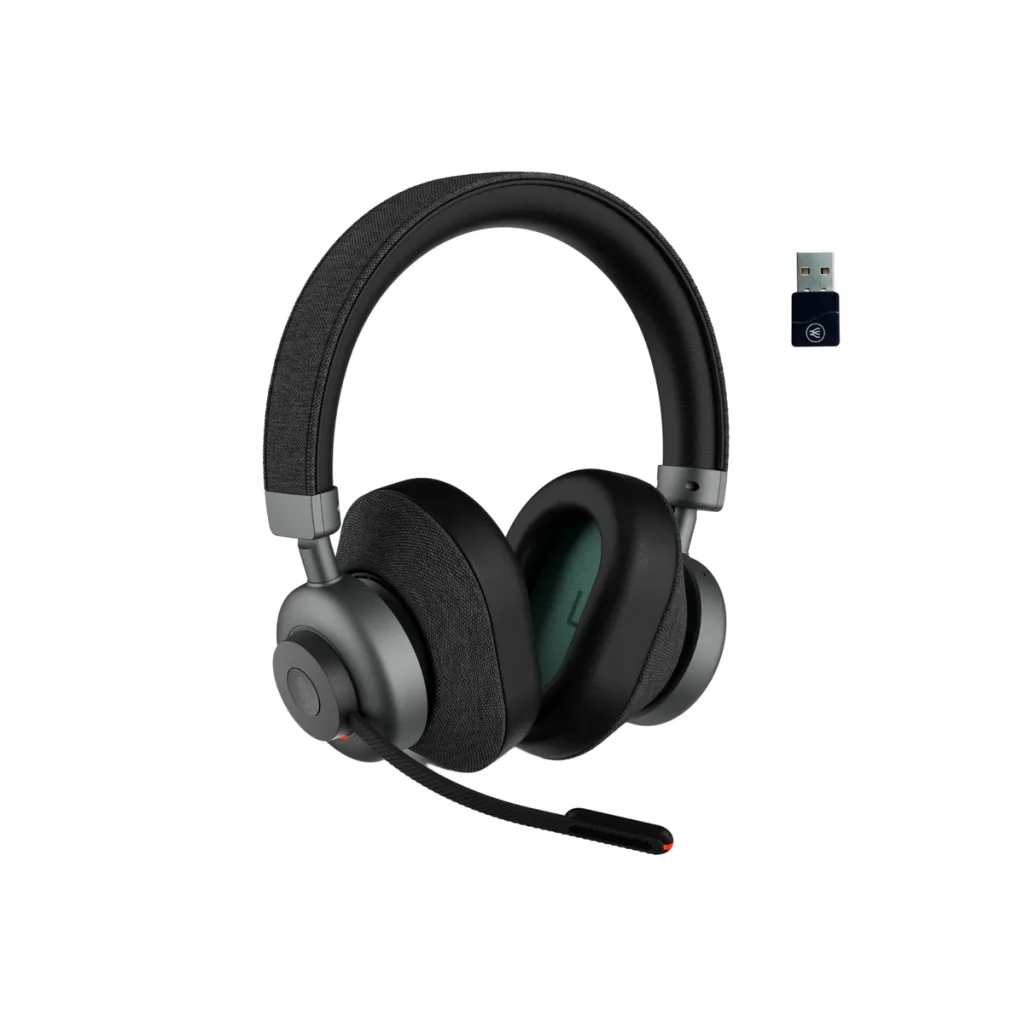
  • Active Noise Cancellation (ANC): Take control of your surroundings by using a headset that has ANC technology. ANC actively cancels out ambient noise, creating a focused environment for you to work and participate in calls without distractions. Unlike a noise canceling microphone, which is designed to remove background noise for your callers, ANC helps you to avoid being distracted by the sounds going on around you. The result is you keep your concentration, and stay on point no matter what distracting sounds you have in your background. But like headset microphones, not all headsets that have Active Noise Cancellation are the same. Some give you ANC on/off only, others will give you ANC high/low, but the better ones, such as the Orosound Tilde Pro I mentioned earlier, gives you multi-stages of ANC adjustment. This allows you to dial up, or dial down the amount of noise you hear.
  • Double ear design. It stands to reason that when you buy a headset to help combat noise, you should be looking at the type that covers both ears. That’s because you get passive noise reduction by having both ears covered, which helps shelter you from intrusive noise. And though you can find Active Noise Cancellation on a mono style headset (though rare), it somewhat defeats the feature’s purpose of blocking noise if one ear is left uncovered. So my advice is seek out a headset that covers both ears, and has ear cushions made of a leatherette material rather than foam. Foam ear cushions are far more porous, which allows sound to infiltrate into the ear. Leatherette material is denser, which helps to better filter out sound.

Double Down to Eliminate Open-Office Noise With neep Ai Noise Canceling Software
For the ultimate in noise reduction, especially in noisy open-plan offices, consider pairing your professional headset with advanced noise-canceling software like neep. This software employs sophisticated algorithms to eliminate background noise from both your end and the caller’s side of the conversation. So you both enjoy a quieter, noise free calling experience.

Here’s how neep noise canceling software elevates your audio experience:

  • Eliminates Background Noise: Say goodbye to all the unwanted sounds like keyboard clicks, chatter, traffic noise, babies crying, dogs barking and the list goes on. neep noise canceling software effectively filters them all out, ensuring a distraction-free environment. And when you’re not distracted, you maintain your concentration, and get more done. And as I mentioned a moment ago, neep noise canceling software removes the sounds coming from your caller’s background too, so everyone gets a better experience.
  • Enhanced Voice Quality: neep optimizes your voice audio, removing background noise and ensuring you sound professional and clear on every call. neep doesn’t stop at noise removal, it goes further. Not only is the noise eliminated, but your voice is enhanced so you always sound your best, no matter what’s going on around you. 
  • Isolates your voice: neep can identify your voice over others, and isolate and enhance it while eliminating the sounds of other voices. neep learns to recognize your voice which allows you to be heard just like you want; loud and clear, while not being overtaken by the sounds of voices in the background.
  • Automatic Volume Adjustment: No more awkward volume fluctuations, or having to repeat yourself. neep noise canceling software automatically adjusts your microphone volume to maintain a consistent level, even as background noise levels change.

Other Tips for a Quieter Workspace:

  • Talk to Your Manager: In an open-plan office, discuss options with your manager. Perhaps designated quiet zones can be established for focused work, or explore noise-reducing office furniture options such as cubicles or sound absorbing products. And though your outreach might not be met with cooperation, that shouldn’t prevent you from asking. You never know unless you ask.
  • Utilize Scheduling Tools: Plan calls during times when the office is typically quieter. This could be mid-morning once everyone has had their coffee, or right after lunch when digestion is in full swing and your coworkers appear to be in a food coma. Collaboration tools that have scheduling features can help you find pockets of peace for important calls. With some advance planning and thought, you may find a workable solution to this ongoing noise problem through this approach.
  • Noise-Canceling Earbuds/Headphones (for Non-Call Situations): While not ideal for calls, noise-canceling earbuds or headphones can be helpful for individual work sessions when you simply need to block out distractions. This may not be a good solution for many, but for others, it may be a good workaround, but not for those times when you’re on calls.
  • Install Noise Monitoring Devices: There are devices available that can be installed in offices that monitor noise levels. Many are adjustable which gives you the opportunity to set the level to your preference. Once noise reaches your pre-established limit, you can be alerted. This may be in the form of a light on a tower that changes color from green, to amber to red as noise escalates. That color change will alert Supervisors to get staff to quiet down. One example of this is made by SoundEar

By implementing these strategies, you can transform your noisy workspace into a haven of focus and productivity. A high-quality, professional headset equipped with good noise-canceling features, combined with powerful neep noise canceling software, empowers you to deliver clear, professional audio on every call –  no matter the background noise. So ditch the distractions, embrace the power of technology, and reclaim your focus in the face of all these noise challenges.

Have questions, or need some help?

Headset Advisor has been assisting customers with tailored communication solutions since 1994. We have a U.S. based team that can help you find the perfect solution to your communication challenges and needs.

We analyze your needs, offer a tailored solution, assist with ordering, provide prompt shipments, and even help you with setup, and provide free, ongoing support. These are things you won’t find anywhere else. So contact us today because we’re here to help.

Quiet Conversations: How Orosound Tilde Pro and neep AI Software Redefine the Noise-Free Calling Experience

Do you work in an office, at home, or on the go? If you do, the battle against office noise has become an integral part of the quest for productivity and focus, and for some, their sanity because noise is bothersome. 

Softphone and video calls, essential components of modern day communication, often bear the brunt of distracting background noises. And you probably know what I’m talking about if you’ve ever been on one of these calls with distractions going on around you. Noise makes it hard to concentrate. Noise distracts you, and your callers, and noise is flat out nothing you want to ignore.

The truth is, office noise has been around for as long as offices have been in existence. You’d think by now that this age-old problem would have been solved by now, yet noise remains. So what can you do if you’re in search of the sounds of silence for you, and your caller’s when on softphone and video calls? Yes, noise is a problem, and yes, there is an answer.

Orosound Tilde Pro Bluetooth Wireless Headset + neep AI noise canceling software

This dynamic duo is designed to redefine your listening experience by giving you the silence you’ve been looking for. 

In this blog, I’ll cover the key features of the Orosound Tilde Pro headset, and the transformative capabilities of neep AI software, showcasing why their synergy represents the pinnacle of noise elimination in the professional office.

Orosound Tilde Pro: A Fortress Against Distractions

The Orosound Tilde Pro is designed, and manufactured in France. That alone makes it a Unicorn among headsets given most others are made in Asia. But its French roots don’t really matter when it comes to the serious business of noise removal, but the features on this headset do. Let’s have a quick look. 

Fully Surrounding Ear Cups For Passive Noise Reduction:

The Tilde Pro takes a proactive approach to noise reduction with ear cups that fully encircle the ears, providing an effective barrier against ambient sounds. This design not only enhances comfort during extended wear but also serves as a foundational element for passive noise reduction, creating a peaceful acoustic environment. Music and voices sound better when outside noise isn’t intruding. If you don’t prefer to have your ears fully covered, and instead prefer ear speakers that rest against the ear, those are available as well.

Multi-Stages Of Active Noise Cancellation (ANC):

The Tilde Pro doesn’t stop at passive noise reduction; it gives you 5 levels of Active Noise Cancellation. These levels work harmoniously to shield wearers from the distractions and annoyances of background noise. Whether it’s the continuous sounds of office equipment or the chatter of coworkers, the Tilde Pro’s ANC adapts to the unique acoustics of your environment, delivering a personalized and immersive auditory experience. So when you want to let some sound in so you don’t feel like you’re in a soundproof chamber, you can. Or, if you want to silence the background noise so you can concentrate better, you can adjust noise levels to your liking. Other headsets that have ANC may only give you ANC on/off, or ANC high/low. Having the ability to fine tun the noise levels can be a significant advantage.

Noise-Canceling Microphone For Crystal-Clear Communication:

In the realm of softphone and video calls, the Tilde Pro’s noise-canceling microphone is a game-changer. By intelligently filtering out background noise, the microphone ensures that your callers hear your voice with pristine clarity, free from the interference of surrounding distractions. This feature becomes a cornerstone for effective communication, eliminating the need to repeat yourself or navigate through awkward silences. Trust me when I say, not all “noise canceling” microphones are the same. Some do a better job at removing noise compared to others.  The Tilde Pro is on the premium side of noise cancellation.

Leak-Proof Sound For Enhanced Privacy:

The Tilde Pro’s commitment to acoustic excellence extends to its leak-proof sound design. This ensures that your private conversations remain confidential, with minimal sound leakage to the external environment. It’s not just about eliminating incoming noise; it’s about creating a secure auditory space for your softphone and video calls. Privacy is one topic that continues to rise in importance, so making even small strides to protect privacy is worth considering.

Battery Plus Wired Mode

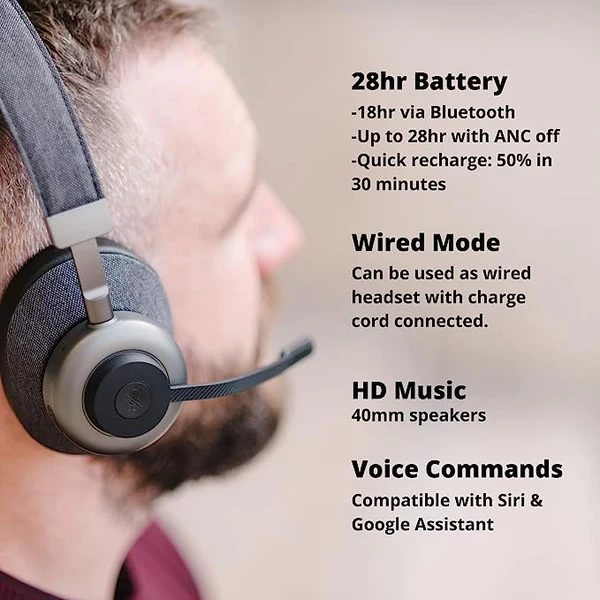
The Orosound Tilde Pro provides up to 28 hours of battery life before a recharge is needed. And if you find yourself in the middle of a call when the battery is begging you for a recharge, no need to worry. You can plug in the included USB cable to begin the recharging process, and continue with your call while the battery is recharging.

Boom Mic Or headphone mode; Your Choice

Before I leave the topic of the Tilde Pro, I’d be remiss if I didn’t mention the fact that you can use the Tilde Pro with, or without the boom microphone. So when you’re on a call, and need the best sound quality, and noise reduction, attach the magnetic boom microphone. And for those times when you’re chilling to some of your favorite music or Podcast, the boom mic is easily removed and can be stored away for use later on. It’s like getting a professional business grade headset, and a pair of entertainment headphones in one.

Next up let’s take a look into the software side of this noise eliminating solution, with neep AI

neep AI Noise Canceling Software: Elevating The Experience

When you are completely reliant on hardware to remove noise, you may find that you come up short. For example, a noise canceling microphone only removes your background noise giving your callers a quieter experience. But what about their noise? Depending on the device they’re using, you may get distracted by the noises stemming from their surroundings.

What about if your hardware malfunctions, or breaks, or for some reason is unavailable? You’ll be left scrambling to find a replacement that hopefully works equally well, which may, or may not happen.

And if either side of the conversation is being distracted by noise, trouble, and frustration mounts, and productivity suffers. The good news is neep AI noise canceling software works in the background seamlessly to eliminate the noise no matter what audio device you’re using. Here’s a few details that help to illustrate the different features of neep, its value, and why this is software you should be using.

Noise Elimination For Both Ends Of The Conversation:

neep AI takes the concept of noise cancellation a step further by addressing both ends of the conversation. While traditional solutions focus on the listener’s experience, neep ensures that your voice is transmitted clearly, without the annoying distractions of background noise, enhancing the overall communication quality. Softphone and video calls become a seamless exchange, unmarred by the disruptions of sound..

Voice Enhancement For Easier Understanding:

neep goes beyond noise elimination; it enhances your voice for optimal intelligibility. Your messages are not just heard; they are understood with precision. This voice enhancement feature becomes invaluable in virtual meetings and calls where conveying information accurately is paramount. Your callers won’t struggle to hear you, and your message will be heard, and understood.

Voice Separation For Unrivaled Clarity:

neep’s sophisticated technology excels in separating your voice from other voices, resulting in unparalleled audio quality and speech clarity. Whether you’re engaging in a one-on-one conversation or participating in a virtual conference with multiple speakers, neep ensures that each voice stands out distinctly, eliminating the confusion of overlapping sounds. And frankly, it’s hard not to appreciate a better sounding meeting.

Compatibility With Your Current Devices:

One of neep’s strengths lies in its compatibility with your existing devices. There’s no need to invest in additional hardware; neep seamlessly integrates with your preferred audio devices, transforming them into powerful tools for noise reduction. This flexibility allows you to leverage the benefits of neep without the hassle of equipment upgrades.

Seamless Integration With Leading Platforms:

to show the different UC platforms neep AI software works with

One of the appealing aspects of neep AI software lies in its seamless integration with the leading communication platforms that professionals rely on daily. Whether you’re navigating Microsoft Teams’ collaborative landscape, participating in virtual meetings on Zoom, conducting calls through RingCentral, or engaging in discussions on Google Meet or Slack, neep AI is your steadfast companion. Its compatibility extends across a spectrum of platforms, ensuring a consistent and superior noise-canceling experience regardless of the communication platform you prefer. 

This versatility not only simplifies the user experience but also amplifies the impact of the Orosound Tilde Pro and neep AI combination, making it a universally applicable solution for achieving auditory excellence in all your voice and video interactions. With neep AI, your journey to a noise-free calling environment is not limited by platform constraints but rather elevated by a harmonious integration across the digital communication landscape.

Suite Of Voice Profiles For Creative Expression:

neep AI brings an element of creativity to the noise-canceling landscape with its suite of voice profiles. Elevate your softphone and video call experiences by changing up how you sound to others. From professional tones to playful personas, neep’s voice profiles allow you to infuse a touch of imagination into your virtual interactions.

Sweet Sound For Your Content Creations

neep AI noise canceling software can also be used with your voice and video content projects. This not only gives you a much better audio track, but it eliminates the need for you to spend money on additional software to accomplish this. neep keeps you on track, and sounding professional across different applications. So whether it’s a podcast you’re creating, or a video to inform, instruct or entertain, neep AI software keeps your voice in that sweet spot.

The Ultimate Solution For Better Calls

If you’re searching for the ultimate noise reduction solution for softphone and video calls, the combination of the Orosound Tilde Pro and neep AI Noise Canceling Software is an unparalleled, unrivaled solution. Together, these exceptional technological tools create a symphony of silence, transforming the myriad of office noise and distractions into a serene environment where frustrations fade, and productivity is allowed to flourish. You simply can’t find a better solution to the problem of office noise.

As professionals navigate the challenges of business communication, the Tilde Pro and neep AI redefine the standards of clarity, focus, and creativity. Softphone and video calls become more than mere exchanges; they become better experiences where your voice takes center stage, unencumbered by the distractions. And you’ll feel a sense of pride and satisfaction with the audio clarity on your content creating projects. And if there’s a wild child that resides within, have a little fun with the voice changer. However you use these tools, you can’t help but have a more professional outcome, and create a few grins along the way.

Embrace the future of noise elimination with the Tilde Pro professional wireless headset and neep AI noise cancelling software, and discover the benefits that lies at the heart of effective communication.

Have questions, or need some help?

Don’t feel like you have to scour the internet alone to find the answers to your questions. Headset Advisor is here to help, and we’ve been helping customers since 1994. So don’t hesitate to contact us because our Advisors are available to help you find the right, compatible solution to your technology challenges and needs. Help is as close as your phone or keyboard, so if you have questions, we have answers.