
Best Noise Suppression Software 2025 – neep
In today’s ever changing work landscape, you might find yourself working in a busy office, at home, or on the go. And though your place of work might change from day to day, one thing that doesn’t change is the need for clear communication without distracting background noise.
Studies have shown that background noise can interrupt concentration, lower worker productivity and can cause a message to be lost in all the noise. And your professionalism, and image is put at risk as well if noise becomes distracting.
Fortunately, advanced noise suppression software like neep is the simple answer to this ongoing problem of distracting background noise.
neep Is The Best Choice For Eliminating Noise
neep is advanced ai powered noise cancellation software designed to eliminate background noise on both ends of a conversation, ensuring clear and focused audio. Whether you’re using a headset, earbuds, a conference phone, or even a USB microphone and computer speakers, neep seamlessly integrates with your device to deliver exceptional audio quality.
Even if you’re using a noise canceling headset, none are able to remove all the noise. So when you pair neep to your current audio device, you get the best of the best in sound quality, and noise removal.
And, if you’re a content creator, and would like to step up your audio game, neep can help clean up your audio files for a more professional sound, and better presentation.
Key Benefits Of Using neep:
- Enhanced Call Quality: neep effectively removes background noise, such as keyboard clicks, chatty coworkers, traffic noise, or even barking dogs, significantly improving the overall quality of your calls.
- Improved Productivity: By minimizing distractions, neep helps you, and your callers stay focused and productive during virtual meetings and online conferences.
- Professional Image: When using neep, you’ll sound consistently loud, clear and professional with enhanced audio, and background noise elimination. This helps you to come across to your callers in a professional manner enhancing your image.
- Versatile Compatibility: neep works seamlessly with a wide range of devices such as headsets, conference phones, earbuds, and even USB microphones. And platforms including Windows, macOS, and Linux making neep a highly versatile application that can be used by everyone.
- User-Friendly Interface: The intuitive interface makes it easy to set up and use, even for those who are not tech-savvy. And though neep is easy to set up, there’s also support reps available to assist with setup and troubleshooting, as well as video tutorials. So getting neep up and running is a breeze. Our goal is to make it easy for you to get neep up and running.
- Affordable Pricing: neep offers a competitive pricing plan, making it accessible to individuals and businesses alike. Priced at just $12/mo for the monthly option, or $9/mo for the yearly option giving you a 25% discount.
How neep Works
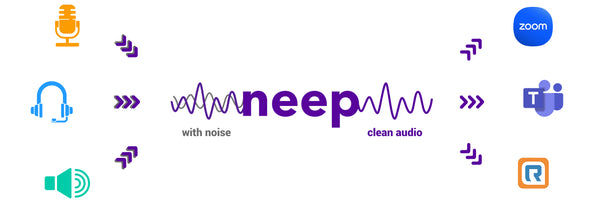
neep employs advanced AI algorithms to analyze and suppress background noise in real-time for your computer based voice, and video calls. The software intelligently distinguishes between your voice, other voices and background noise, ensuring you sound clear and audible while neep removes noise in the background that can become distracting.
neep’s Unique Features
- Dual-Channel Noise Cancellation: neep not only suppresses the noise on your end but also removes background noise from the other party’s audio, ensuring a clear conversation for both sides. Gone are the days where you have no control over both sides of the audio. neep gives you the tools to have a better, more productive conversation.
- Voice isolation. neep isolates your voice from the sounds of others, and then enhances and improves the audio signature. It then adjusts the volume automatically which allows your callers to hear you better.
- Real-time Noise Reduction: neep processes audio in real-time, providing instant noise reduction without any noticeable latency. neep runs quietly in the background giving you premium audio.
- Noise reduction for recorded audio files. Rather than using a third party application for enhancing the sound quality on your recorded audio files, neep can take care of that too. No need to use additional software.
- Customizable Settings: You can fine-tune the noise reduction settings to suit your specific needs and preferences. Some might want more noise reduction, while others might want or need less. Either way, you can fine tune the settings to meet your specific needs.
- Cross-Platform Compatibility: neep works seamlessly with a wide range of devices and platforms, including Windows, macOS, and Linux. So whichever system you use, neep is sure to be compatible.
- Try neep for Free Before committing to a subscription, you can try neep for free. This allows you to experience the benefits firsthand and see how it can improve your audio quality. Even if you use a device that claims to be noise reducing, these devices cannot remove all the noise. And when noise elevates, you need the best tools to remove it, which is where neep comes in, no matter what audio device you use.
Affordable Pricing
As mentioned earlier, neep is affordable for anyone. So whether you work for a large company, or you work solo at home, neep won’t break the bank. Priced at just $12/mo for the monthly option, or $9/mo for the yearly option that gives you a 25% discount, neep fits into anyones budget.
The Final Word
neep is the ultimate solution for anyone seeking to improve the quality of their audio calls and online meetings. By eliminating background noise, neep gives you the tools to communicate clearly, and effectively, helping to boost productivity, and enhance your professional image. neep gives you, and your callers a better sounding, more professional, noise free call. And if both parties aren’t distracted by noise, your message is heard, and business gets done.
Try neep For Free

Free Trial. So, why wait? Try neep today and experience the difference. Just go to neep.com to sign up for your free trial, and then let one of our friendly support reps help you get neep set up so you can begin enjoying better sounding, noise free calls.
Have Questions About neep?

If you have questions about neep, or any of our other products, make sure to contact us for some fast, free and friendly assistance. With over 30 years of experience, we can help you find the perfect solution for your unique needs.
Ready to put this to work? See neep’s pricing and a free trial, or learn how to set up neep with your calling app. On a laptop, here’s noise cancelling for Windows and Mac; using a standalone mic, see how to reduce background noise on your microphone.






Your point of view caught my eye and was very interesting. Thanks. I have a question for you. https://accounts.binance.info/sv/register-person?ref=GQ1JXNRE
Thanks for sharing. I read many of your blog posts, cool, your blog is very good.
Your article helped me a lot, is there any more related content? Thanks! https://www.binance.com/register?ref=IXBIAFVY
I don’t think the title of your article matches the content lol. Just kidding, mainly because I had some doubts after reading the article. https://www.binance.com/register?ref=JW3W4Y3A
Your point of view caught my eye and was very interesting. Thanks. I have a question for you.
Thanks for sharing. I read many of your blog posts, cool, your blog is very good. https://accounts.binance.info/ru/register?ref=O9XES6KU
Your point of view caught my eye and was very interesting. Thanks. I have a question for you. https://accounts.binance.info/es-MX/register-person?ref=GJY4VW8W
I don’t think the title of your article matches the content lol. Just kidding, mainly because I had some doubts after reading the article.
Your article helped me a lot, is there any more related content? Thanks!
Thanks for sharing. I read many of your blog posts, cool, your blog is very good.
I don’t think the title of your article matches the content lol. Just kidding, mainly because I had some doubts after reading the article. https://accounts.binance.bh/kz/register?ref=K8NFKJBQ
Your point of view caught my eye and was very interesting. Thanks. I have a question for you.