How To Remove Background Noise 2025

If you’re like me, you probably find background noise distracting especially when you’re on important calls. Noise can not only be distracting, but it can be just plain annoying, not to mention how it can affect call quality, and worker productivity.

In order to explore ways to remove noise, it’s important to first better understand the source of noise, and how it affects you, your callers, and your calls.

So let’s take a closer look at the different types of noise; where it comes from, and how it puts a drain on productivity.

Noise Comes In Many FormsHere Are Just A Few

Office Noise. If you work in a busy office, you’ve probably experienced first hand the different noise challenges associated with working around a group of people. Noise can come from background conversations, office equipment sounds, doors closing, HVAC systems running, traffic noise and the list goes on. If you can hear the noise, you may become distracted by it, and your callers as well.

Home Office. For those who work from home, they’re not exempt from noise. Anyone who has children knows they can be distracting. And if you own a four legged friend, most will get enthusiastic if they spot a delivery truck like UPS, FedEx, Amazon or the US Postal Service. Then there’s the comforting sounds of landscape equipment such as lawn mowers and leaf blowers. The perfect touch to help close that deal, right? Of course not!

Hybrid Workers. If you’re someone who has a more nomadic style as to where you do your work, noise is all around you. If you set up shop at the local Starbucks, at the airport or train, you’re well aware of the full complement of noises going on around you. The sounds of dishes and utensils, cars, background conversations, background music, and the list continues. The bottom line is when you work remotely, you face an enormous challenge when it comes to noise.

The Impact That Noise Has On Us

frustrated woman office worker due to noise.

When you think about noise, and how it can affect you while on important calls, it doesn’t take long to conclude that its impact isn’t positive. So with that in mind, what are the specific problems caused by noise? Here are a few of them:

Causes you to lose your concentration. If you’re locked in on a conversation, and paying close attention to details, background noise can interfere with your ability to remain focused. If your focus, and concentration are negatively affected, then you’ll be less likely to accomplish your call objectives.

Distracts your callers. Like you, your callers can become distracted by the noise going on in your background. If this happens, they might miss important information, or misinterpret your message which can create problems and put important deals in jeopardy. That aside, noise can just irritate the heck out of your callers too.

Causes you to appear unprofessional. When noise finds its way into your calls, it’s easy for you to come across as unprofessional, unprepared, and even unworthy of securing a customer’s business. Noise creates an unfavorable impression that can truly derail deals. Impressions matter, and putting a lid on noise should be one of your high priorities.

Brings down worker productivity. In an era where there’s so much data, it’s easy to see who’s productive, and who’s not. These days, you need every advantage you can get, and if noise is an obstacle to being your most productive self, then doesn’t it make sense to address it?

When you get distracted by noise, and your callers get distracted by it, neither of you can perform at your best. Whether this distracts you consciously or unconsciously, noise is a problem, and it shouldn’t be ignored.

So What Can You Do To Tackle Noise?

Here are a few Things You Can Do:

Environmental

This applies to those who work in offices. Offices can be constructed using hard surface materials like glass, marble, granite and others similar materials. It can also incorporate sound absorbing materials like carpet, cubicles, or even acoustic wall and ceiling tiles. 

worker installing acoustic ceiling tiles

This may be a workable solution for some, but there are challenges to this including having the required budget to install sound absorbing material. The other drawback to this approach is it won’t filter out all the noise which means nearby conversations, for example, will still be heard. So even though installing cubicles or sound absorbing material is a good idea, it isn’t the total solution.

Seek a quiet spot. Maybe you just relocate to a quiet space whenever you need to get on an important call. That could work, but what if the quiet space isn’t available, or you get an unexpected call when not in a quiet space? Bottom line, this may work in some situations, but taking this approach isn’t the best one available to you as you’ll soon see.

Hardware

collage of communication devices, headset, Airpods, conference phone and microphone

Taking this approach, you’ll likely be considering:

  • A noise canceling headset
  • A noise canceling conference phone
  • Earbuds
  • A USB Microphone and speakers

Headset. A headset that has a noise canceling microphone is a very good first step. But, keep in mind, a headset’s ability to remove noise varies greatly between model to model, and brand to brand. One thing for sure is no headset removes all background noise which means noise can still be a problem even if your headset is designed to remove it.

Noise canceling conference phone. Even though many conference phones come equipped with multiple noise canceling microphones, noise suppression, and echo cancellation, there remains some inherent shortcomings of this as your weapon against noise.

For starters, this is a handsfree, broadcast device that pushes the far end audio out of the central loudspeaker. By design, those sitting nearby are given the ability to hear, and be heard. But those who aren’t part of the call, but within hearing range of the call can also hear its contents. And if you’re dealing with sensitive information, that’s not ideal.

Like headsets, conference phones aren’t able to remove all the noise which leaves you with the problem, albeit improved, but still present.

Earbuds. Earbuds are an offshoot of headsets, and remain a popular choice for a lot of people. A lot of people use earbuds for business calls, many of which are unaware of the impact of their audio deficiencies. Generally speaking, earbuds are a poor choice for removing unwanted noise because most don’t do a good job, including popular brands like AirPods. 

Microphone audio quality, combined with poor noise cancellation are good reasons to give pause to earbuds for business calls. Beyond this, most earbud style headsets lack battery strength which means they might not be suitable for the talk time you need for a typical, or busy workday.

USB microphone and speakers . This approach represents my least favorite among those listed here. So much depends on the quality of the microphone as to how you’ll sound to your callers, and how much background noise is eliminated. Beyond that uncertainty, you’re back into broadcasting the content of your calls to anyone within hearing distance, and of course unable to leave your desk. Can this work? Of course, but there is a better option, which I’ll detail now.

Software

laptop with colorful icons suggesting apps

Recently, a new, advanced Ai based noise cancellation software was released called neep.

Yes, I know, it’s a funny name, but there’s nothing funny about the way it destroys background noise because when it comes to removing unwanted noise, neep is all business.

There are many advantages to using neep noise canceling software. Perhaps the biggest thing is it works with your current audio device such as those listed above, and with Windows, Mac and Linux operating systems. That makes neep highly versatile thereby avoiding the need to make additional purchases.

neep Performance

neep is designed to do exactly what you want and need, which is to eliminate background noise so you can have better, more professional sounding calls.

Real-Time Noise Reduction: neep utilizes advanced AI algorithms to analyze and remove background noise in real-time, ensuring uninterrupted and crystal-clear communication.

Professional Sound Quality. Sound quality goes far beyond the sound of your voice because sound quality also pertains to the total audio experience your callers hear. So yes, your voice audio quality matters, as does eliminating the noise in the background whether that’s the sound of coworkers, traffic noise, children, dogs or whatever, neep flat out gets the job done.

Isolates and enhances your voice. neep will isolate your voice from the sound of others, and at the same time, it works to improve your voice audio quality. Your callers will hear you loud, clear and professional, and your message will be understood.

Customizable Settings: You can fine-tune the noise reduction settings to suit your specific needs and preferences. Some might want more noise reduction, while others might prefer less. Either way, you can fine tune the settings to meet your specific needs.

Dual-Channel Noise Cancellation: neep not only eliminates noise on your end, but also tackles background noise from the other party’s audio feed, leading to a truly clear and focused conversation for everyone. So if your callers don’t have the tools to eliminate background noise, neep takes care of it.

User-Friendly Interface: The intuitive interface makes neep accessible to all users, regardless of technical expertise. Add to that we provide free personal assistance for help with questions, or set up. We even provide video tutorials for those who prefer that approach. Either way, we’re here to help make things easy for you.

Noise reduction for recorded audio files. Rather than using a third party application for enhancing the sound quality on your recorded audio files, neep can take care of that too. No need to use additional software.

Become A Believer – Try neep For Free

logo of neep software with caption of silence the noise for free

Free trial offer. Before committing to a subscription, you can try neep for free. This allows you to experience the benefits firsthand and see how it can improve your audio quality. Even if you use a device that claims to be noise reducing, these devices cannot remove all the noise. And when noise elevates, you need the best tools to eliminate it which is where neep comes in. No matter what audio device you use across Windows, Mac or Linux platforms, neep will dramatically improve the quality of your calls.

To get started with your free trial of neep, just go to neep.com today! 

If you still have questions about neep, you might want to visit our FAQ page for some answers.

Have Questions, Or Need Some Help?

smiling customer service rep

Don’t hesitate to reach out to us for some helpful assistance. Whether you have questions about neep software, or need a tailored headset recommendation, we’re here to help. We’ve been assisting customers with their communication needs for 30 years, and I’m sure we can help you too. So don’t hesitate to contact us because our knowledgeable and friendly Advisors are here to help.

Software noise canceling for Windows and Mac – neep

Many Windows and Mac users are looking for better noise canceling. So many of our applications today are computer based, and because of that, sound quality, and noise reduction are two things that remain highly important.

Whether you use a softphone for your voice calls, or participating in video meetings, how you sound to others, and how they sound to you matters. Of course you want to sound your best, and you certainly want your message to be heard, and understood. And you don’t want background noise to distract your callers. 

graphic showing the word noise with a wood plank background
  • Noise is distracting
  • Noise annoys people
  • Noise can increase stress and anxiety
  • Noise can cause your message to get lost in the chaos
  • Noise is known to lower productivity
  • Noise can make you appear unprofessional and disorganized.

So what can you do if you use Windows or Mac operating systems, and you use applications such as Microsoft Teams, Zoom, RingCentral or any of the other popular applications for your communications, and you want to dial down the background noise?

Here are some common approaches that many take:

Get a noise canceling headset? Sure, you could do that, but there isn’t a headset made that eliminates all the noise. And because of that, noise can still find its way into your conversations leading to distractions, and misunderstandings.

Earbuds, AirPods etc. Though this is a popular headset wearing style, earbuds overall come up short in the voice audio quality, and noise elimination areas. And if that weren’t enough, most have limited talk time which can cut you off in the middle of important conversations if the battery gives out. 

Conference phone. That could work. After all, conference phones,  like headsets, have audio characteristics that are designed to optimize sound quality, right? Yep. Problem is, just like a headset, conference phones won’t eliminate all the noise, not to mention other limiting factors  associated with conference phones such as limited microphone range, and call content is broadcasted to anyone within hearing distance which puts sensitive information at risk.

USB microphone & computer speakers. The least desirable option, but as devices go, it can work, although its efficiency is highly dependent on the type and quality of microphone used. For the vast majority of people who employ this option, you’ll sacrifice voice audio quality and noise reduction and like a conference phone, the content of your call will be available to anyone within hearing distance. My vote? Two thumbs down on this one.

USB Handset. Finally, you could consider plugging in a USB handset. You’d still be facing these same audio challenges, most notably with noise cancellation. And when you stop to consider the inefficiencies of holding a handset while attempting to type on your computer keyboard, I’m sure you can see the problem. And if you go down the path of cradling the handset on your shoulder, make sure your health insurance premiums are paid up because you’ll be paying a visit to your Doctor at some point.

So What Do You Do?

If this leaves you scratching your head and a bit perplexed, you may end up defaulting to one of the options listed above. It would be understandable given the absence of a known solution. That is until now, because there is an affordable, simple solution that works with any audio device, and it will enhance sound quality, and dramatically reduce background noise. This is a new software solution called:

neep noise canceling software

Why neep?

What makes neep the go-to solution for noise canceling for anyone who uses Windows or Mac operating systems? Here are a few points to consider if sounding better, and removing distracting noise is something you’re interested in.

Voice isolation & enhancement. Neep isolates your voice from the sounds of others, and then enhances and improves the audio signature. It then adjusts the volume automatically which allows your callers to hear you better.

Cross-Platform Compatibility. neep works seamlessly with a wide range of devices and platforms, including Windows, MacOS and Linux making it highly versatile. So whichever system you use, neep is sure to be compatible. 

Works with any audio device. Whether you use a headset, conference phone, earbuds or any other audio device, neep will improve the voice audio quality, and it will significantly improve the noise reduction. Feel free to use whichever device you like best because when you combine that with neep, you’ll experience a major improvement to how you sound, and how much noise is reduced.

Dual channel noise cancellation. neep not only suppresses the noise on your end, but also removes background noise from the other party’s audio ensuring a clear conversation for both sides. Gone are the days where you have no control over both ends of the audio. Neep gives you the tools to have better, more productive conversations.

Noise reduction for recorded audio files. Rather than using a third party application for enhancing the sound quality of your recorded audio files, neep can take care of that too. No need to use additional software.

Real time noise reduction. Neep processes audio in real time, providing instant noise reduction without any noticeable latency. Neep runs quietly in the background giving you a seamless premium audio experience.

U.S. based support. Neep gives you more, and one of the ways is in the area of support. You get easy access to our U.S. based support. You can call, email, text or live chat with us Monday through Friday 7:00 a.m. to 4:00 p.m. PST. We’re located in Northern California and available to assist you with all your communication needs. So if you’d like a hand in getting neep set up, or need information on a compatible solution, we’re here to help!

Takeaway

Noise is a real pain, and it gets in the way of sounding our best, and being our most productive self. So if you’re looking for a noise canceling software solution for Windows and Mac, and  you’re serious about sounding better to your callers, then neep is a solution you need to seriously consider. Even if your current audio device offers noise cancellation, it can’t remove it all. But, when you combine your current device with neep, you’ll be amazed at how much better your calls will sound. But don’t take my word for it, why not try it out for free, and then you can decide if neep is right for you.

Try neep For Free

try neep for free

neep is available for a free trial. Just go to neep.com to sign up for your free trial. There’s no better way to know how good a product is than trying it out yourself.  Give it a try today!

Have Questions Or Need Some Help?

Headset Advisor has been assisting customers with their communication needs for 30 years. So if you have questions, or need a tailored, compatible solution, don’t hesitate to contact us, and one of our friendly, knowledgeable Advisors will be happy to assist. If you still have questions about neep, you may find value in visiting our neep FAQ page.

Best Noise Suppression Software 2025 – neep

In today’s ever changing work landscape, you might find yourself working in a busy office, at home, or on the go. And though your place of work might change from day to day, one thing that doesn’t change is the need for clear communication without distracting background noise.

Studies have shown that background noise can interrupt concentration, lower worker productivity and can cause a message to be lost in all the noise. And your professionalism, and image is put at risk as well if noise becomes distracting.

Fortunately, advanced noise suppression software like neep is the simple answer to this ongoing problem of distracting background noise.

neep Is The Best Choice For Eliminating Noise

neep is advanced ai powered noise cancellation software designed to eliminate background noise on both ends of a conversation, ensuring clear and focused audio. Whether you’re using a headset, earbuds, a conference phone, or even a USB microphone and computer speakers, neep seamlessly integrates with your device to deliver exceptional audio quality. 

Even if you’re using a noise canceling headset, none are able to remove all the noise. So when you pair neep to your current audio device, you get the best of the best in sound quality, and noise removal.

And, if you’re a content creator, and would like to step up your audio game, neep can help clean up your audio files for a more professional sound, and better presentation. 

Key Benefits Of Using neep:

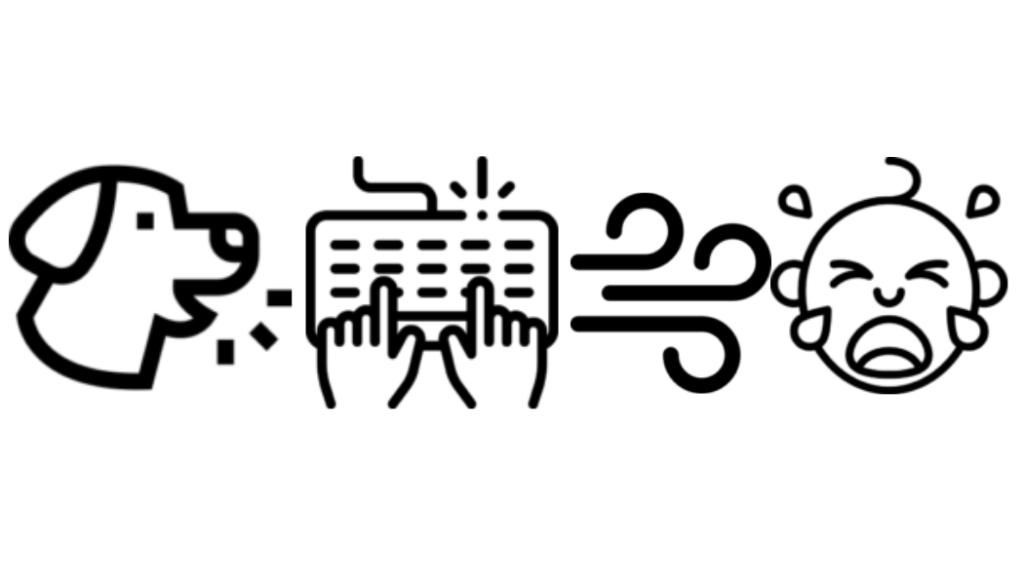
  • Enhanced Call Quality: neep effectively removes background noise, such as keyboard clicks, chatty coworkers, traffic noise, or even barking dogs, significantly improving the overall quality of your calls.
  • Improved Productivity: By minimizing distractions, neep helps you, and your callers stay focused and productive during virtual meetings and online conferences.
  • Professional Image: When using neep, you’ll sound consistently loud, clear and professional with enhanced audio, and background noise elimination. This helps you to come across to your callers in a professional manner enhancing your image.
  • Versatile Compatibility: neep works seamlessly with a wide range of devices such as headsets, conference phones, earbuds, and even USB microphones. And platforms including Windows, macOS, and Linux making neep a highly versatile application that can be used by everyone.
  • User-Friendly Interface: The intuitive interface makes it easy to set up and use, even for those who are not tech-savvy. And though neep is easy to set up, there’s also support reps available to assist with setup and troubleshooting, as well as video tutorials. So getting neep up and running is a breeze. Our goal is to make it easy for you to get neep up and running.
  • Affordable Pricing: neep offers a competitive pricing plan, making it accessible to individuals and businesses alike. Priced at just $12/mo for the monthly option, or $9/mo for the yearly option giving you a 25% discount.

How neep Works

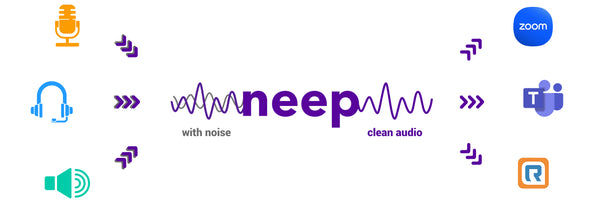
neep graphic showing what neep works with and how it filters noise

neep employs advanced AI algorithms to analyze and suppress background noise in real-time for your computer based voice, and video calls. The software intelligently distinguishes between your voice, other voices and background noise, ensuring you sound clear and audible while neep removes noise in the background that can become distracting.

neep’s Unique Features

  • Dual-Channel Noise Cancellation: neep not only suppresses the noise on your end but also removes background noise from the other party’s audio, ensuring a clear conversation for both sides. Gone are the days where you have no control over both sides of the audio. neep gives you the tools to have a better, more productive conversation.
  • Voice isolation. neep isolates your voice from the sounds of others, and then enhances and improves the audio signature. It then adjusts the volume automatically which allows your callers to hear you better.
  • Real-time Noise Reduction: neep processes audio in real-time, providing instant noise reduction without any noticeable latency. neep runs quietly in the background giving you premium audio.
  • Noise reduction for recorded audio files. Rather than using a third party application for enhancing the sound quality on your recorded audio files, neep can take care of that too. No need to use additional software.
  • Customizable Settings: You can fine-tune the noise reduction settings to suit your specific needs and preferences. Some might want more noise reduction, while others might want or need less. Either way, you can fine tune the settings to meet your specific needs.
  • Cross-Platform Compatibility: neep works seamlessly with a wide range of devices and platforms, including Windows, macOS, and Linux. So whichever system you use, neep is sure to be compatible. 
  • Try neep for Free Before committing to a subscription, you can try neep for free. This allows you to experience the benefits firsthand and see how it can improve your audio quality. Even if you use a device that claims to be noise reducing, these devices cannot remove all the noise. And when noise elevates, you need the best tools to remove it, which is where neep comes in, no matter what audio device you use.

Affordable Pricing

As mentioned earlier, neep is affordable for anyone. So whether you work for a large company, or you work solo at home, neep won’t break the bank.  Priced at just $12/mo for the monthly option, or $9/mo for the yearly option that gives you a 25% discount, neep fits into anyones budget.

The Final Word

neep is the ultimate solution for anyone seeking to improve the quality of their audio calls and online meetings. By eliminating background noise, neep gives you the tools to communicate clearly, and effectively, helping to boost productivity, and enhance your professional image. neep gives you, and your callers a better sounding, more professional, noise free call. And if both parties aren’t distracted by noise, your message is heard, and business gets done. 

Try neep For Free

neep free trial image

Free Trial. So, why wait? Try neep today and experience the difference. Just go to neep.com to sign up for your free trial, and then let one of our friendly support reps help you get neep set up so you can begin enjoying better sounding, noise free calls.

Have Questions About neep?

neep support representative

If you have questions about neep, or any of our other products, make sure to contact us for some fast, free and friendly assistance. With over 30 years of experience, we can help you find the perfect solution for your unique needs.