

From Noise to Nirvana: Transform Your Calls with Advanced Noise-Canceling Microphones
In today’s typical work environments, background noise can be a major hindrance to effective communication. Whether you’re working in a noisy office, at home, or on the go, finding a microphone that effectively cancels out unwanted noise is essential for maintaining clear, uninterrupted conversations. Because when noise gets in the way, you can lose focus, your callers can lose your message, and frustration can increase.
But with so many audio options available on the market, it can be challenging to determine which device, and which microphone is the best choice for your needs. In this blog, we’ll explore some microphone options you can consider that can help remove background noise, including:
- Laptops
- Webcams
- Business Headsets
- Conference Phones
- Noise Canceling Software
Let’s start with webcams and laptops. Though Laptops, and webcams wouldn’t be our recommended go-to solution, it may be one that works for you, depending on the amount of noise in your environment, and the degree of noise you’re wanting to suppress.
Webcams:
Some high-end webcams, like the Logitech 4K Pro Webcam, are starting to incorporate noise-canceling microphones, catering to the growing demand for clear audio during video calls. And if this approach solves your problem, great! But the noise on softphone calls will remain. But if you only need noise suppression for video calls, then this may be something to consider, though I’d try the camera before buying it to make sure it removes enough of your noise. Otherwise, you’ll have to go through the return process, and depending on where you bought it, that could be difficult.
Hear the difference on your own calls.
Start your free 14-day trial →No credit card required · set up in under 2 minutes
Laptops:
Some laptops these days include noise canceling software, which might be enough to take care of your problem. If you’re at your desk, and on a softphone or video call, the resident noise canceling software may do the trick. Then again, what happens if you need to step away from your desk to grab some coffee, go to the bathroom, or have a side conversation with a coworker? That may prove to be inconvenient for a variety of reasons. So is this the best option? I’d argue not. So let’s continue.
Headsets with Noise-Canceling Microphones:
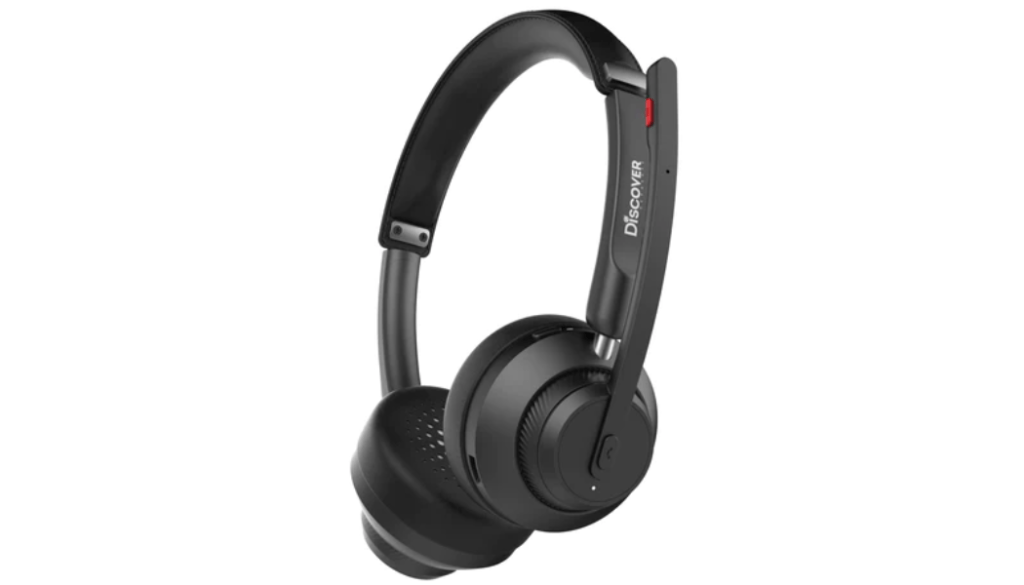
Headsets equipped with noise-canceling microphones, and Active Noise Cancellation, are an excellent option for individuals looking to remove background noise during voice and video calls. Employing this option brings you closer to solving your noise problem. Noise canceling microphones use advanced technology to filter out unwanted sounds, ensuring that your voice comes through loud and clear to your callers. Something to keep in mind if you’re shopping for a noise canceling headset for your softphone or video calls, is to make sure you know what kind of microphone the headset has. Some headsets have non-noise canceling microphones, which don’t remove any background noise. Others have noise canceling, or ultra-noise canceling microphones. And with these different microphone types, it’s hard to know how well it will perform at removing your background noise. And if it does a superb job at removing your noise, what happens to the voice audio quality? Does it suffer, as some headsets do? Like with the webcam advice above, I’d recommend trying the headset before deciding to buy it. This way, you’ll know in advance if the headset you’re considering will perform to your expectations.
One model we can endorse without reservation for superior noise canceling, is the Orosound Tilde Pro. The Tilde Pro microphone removes a high amount of noise, and the audio quality is excellent. Add to that, the Tilde Pro comes with Active Noise Cancellation, with multiple levels of adjustment. ANC cancels background noise so you don’t get distracted by it. The microphone removes noise for your callers, and ANC removes noise for you. Not all headsets have ANC, and those that do may only offer on/off, or high/low. The Tilde Pro lets you control how much noise you hear. To learn more about ANC, here’s a good article by Bang and Olufsen titled “What is Active Noise Cancellation?”
Conference Phones:

For individual or group calls or meetings, conference phones with noise-canceling microphones offer an ideal solution. Some brands utilize a single, omni-directional microphone that picks up sound from all directions, while removing some of the background noise. Other brands employ multiple gated microphones that turn on and off depending on which direction the voice is coming from. In both cases, you can expect to receive echo cancellation, noise suppression, and full-duplex audio. These conference phones are perfect for collaborative environments where multiple voices need to be heard with minimal interference from background noise. And though I’m repeating myself here, you may want to try a conference phone prior to making a buy decision because performance does vary from model to model, and brand to brand.
neep Noise Canceling Software:

In addition to hardware solutions, specialized software like neep’s microphone noise removal offers a powerful way to remove background noise from both ends of a conversation. Compatible with Windows, Mac, and Linux operating systems, neep is a simple download that provides highly effective noise cancellation at an affordable price. By learning your voice and isolating it from other sounds, neep ensures that you’re always heard loud and clear, even in the noisiest environments. The software automatically adjusts the volume to compensate for background noise, ensuring that your callers don’t struggle to hear you. And if you’re a content creator and would like to improve the audio quality of your creations, neep can be used for that too.
As a stand alone solution, neep is rock solid, but there’s a way to take this to the next level.
The Ultimate Noise-Canceling Combo: Headset + Software

While noise-canceling microphones in headsets offer a significant improvement, pairing them with software like neep noise cancellation software can take your call clarity to the next level. Here’s why:
- Double the Noise Reduction: neep AI software works on both ends of the call, removing background noise from both your microphone and your caller’s microphone. This ensures a truly noise-free conversation, regardless of your environment.
- Voice Isolation & Enhancement: neep noise canceling software utilizes advanced AI technology to recognize, and then isolate your voice from surrounding noise. This ensures your voice is consistently clear and well-balanced, even in the noisiest environments.
- Automatic Volume Adjustment: No more fiddling with volume controls! neep AI noise canceling software automatically adjusts call volume in real-time, ensuring a smooth and consistent listening experience for both parties.
So if you’re challenged by the distracting sounds of an office, or the unique noises when working at home, you do have tools to help you fight back. When you combine the power of a good quality, business grade headset with neep noise canceling software, I can assure you that noise doesn’t stand a chance when up against these two noise assassins. In our view, your best, and most readily accessible tool to help combat intrusive noise is combining the use of these two products.
Final Thoughts:
Finding the right microphone that cancels background noise is essential for maintaining clear and productive communication in any environment; at the office, at home, or on the go. Whether you opt for a headset, conference phone, or specialized software solution like neep, investing in technology that prioritizes noise cancellation will undoubtedly improve the quality of your conversations. And though it may take some time to sort through your options, it’s time well spent. After all, better quality conversations are worth a lot wouldn’t you agree?
Headset Advisor: Finding Your Perfect Noise-Canceling Solution

If you have questions or need assistance finding the perfect solution for your needs, don’t hesitate to reach out to Headset Advisor. With decades of experience in providing tailored communication solutions, we’re here to help you find the perfect microphone for your needs. We’ll tailor a perfect, compatible solution, and help you every step of the way, including with installation and troubleshooting. Contact us today and we’ll be happy to help.
Next step: learn how to cut background noise on your microphone, see our roundup of the best noise suppression software in 2025, or grab a free 14-day trial of neep.






Your article helped me a lot, is there any more related content? Thanks! https://www.binance.info/es/register?ref=RQUR4BEO
Thank you for your sharing. I am worried that I lack creative ideas. It is your article that makes me full of hope. Thank you. But, I have a question, can you help me? https://www.binance.info/sl/register?ref=GQ1JXNRE
Just signed up with 5956betlogin, and the interface is slick! Finding my way around easily. Hoping for some good wins! Check it out here: 5956betlogin
Downloaded the 92betapp, and it’s smooth as butter. Easy to bet on the go. Thumbs up from me! Download it here: 92betapp
Feeling VIP at 888riovip. The site is super classy and the customer service was great. Worth checking out! Feel like a VIP: 888riovip
Your point of view caught my eye and was very interesting. Thanks. I have a question for you. https://www.binance.info/en-IN/register?ref=A80YTPZ1
I don’t think the title of your article matches the content lol. Just kidding, mainly because I had some doubts after reading the article. https://accounts.binance.com/en-ZA/register-person?ref=B4EPR6J0
Your article helped me a lot, is there any more related content? Thanks! https://www.binance.com/register?ref=JW3W4Y3A
Thank you for your sharing. I am worried that I lack creative ideas. It is your article that makes me full of hope. Thank you. But, I have a question, can you help me?
Your point of view caught my eye and was very interesting. Thanks. I have a question for you. https://accounts.binance.com/register/person?ref=QCGZMHR6
Can you be more specific about the content of your article? After reading it, I still have some doubts. Hope you can help me. https://accounts.binance.bh/zh-TC/register/person?ref=DCKLL1YD
Your article helped me a lot, is there any more related content? Thanks!
I don’t think the title of your article matches the content lol. Just kidding, mainly because I had some doubts after reading the article.
Can you be more specific about the content of your article? After reading it, I still have some doubts. Hope you can help me.