
Here’s a list of the most common troubleshooting questions and how to resolve them.
My Company is blocking neep what ip or domain names need to be whitelisted?
neep needs to be able to connect to these domains:
securetoken.googleapis.com
identitytoolkit.googleapis.com
firestore.googleapis.com
auth.neep.com
us-central1-headset-prod.cloudfunctions.net
neep.com
My mac doesn’t recognize recognize the neep drivers.
If you get an error message like “the neep driver may not have been installed correctly. Please reinstall the application.”
This is likely due a login setting that needs to be enabled from your Login items. To get to your login items there’s 2 ways:
Method 1: Using System Settings
Click on the Apple icon in the top left corner of your screen.
Select “System Settings” from the dropdown menu.
In the sidebar, click on “General”.
Scroll down a bit in the right pane and look for “Login Items”.
Method 2: Using Keyboard Shortcut (Not all versions of macOS support this)
Press and hold the Option (⌥) key.
Click on the Apple icon in the top left corner of your screen.
From the dropdown menu that appears with extended options, select “System Settings”.
In the sidebar, click on “General”.
Scroll down a bit in the right pane and look for “Login Items”.
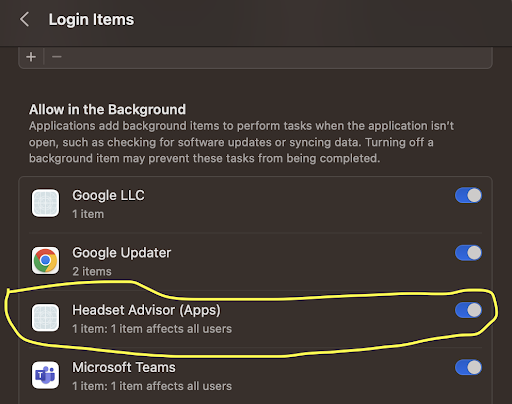
You will want the Headset Advisors (Apps) checkbox enabled as referenced below:
neep isn’t canceling background noise when I talk
- Follow the neep setup instructions to make sure neep is setup properly. If it’s not setup properly, neep won’t work as expected.
- For Windows go to your start menu > Device Manager > sound and video game controlls > Disable “Intel smart sound technology USB audio” and “Intel smart sound technology for digital microphones”

