Q: What is neep, and how does it work exactly?
A: neep is an Ai based software application that’s designed to remove distracting noise in your
background when you’re on computer based voice and video calls. It focuses on your voice,
removes sounds in the background, and provides your callers with a better audio experience.
Q: Why would I use neep?
A: Noise is known to reduce worker productivity, and it’s also known to be very annoying and
distracting to those who are on voice and video calls. When you use neep noise canceling
software, it will give you, and your callers a noise free calling experience, so you can get more
done, and eliminate the annoyances associated with distracting background noise.
Q: Can neep remove the noise in my caller’s background too?
A: Yes. neep not only removes unwanted sounds in your background, but neep also removes
noise from your caller’s background as well.
Q: What are the hardware requirements to allow neep to provide the best results?
A: neep works with Windows, Mac and Linux devices. Currently neep does not work on mobile phones (iphone or android) or with chromebooks. Below are the minimum computer speed requirements:
Windows:
Windows 10 (version 1809) or above
CPU: Intel Broadwell 5th Gen Core i3 (2014 and later) AMD Steamroller @20Ghz
Disk: 500 mb of free space
RAM: 4GB, but 8GB is recommended
Mac:
10.15 Catalina (minimum supported)
CPU: Intel Broadwell 5th Gen Core i3 (2014 and later), Apple M1, M2
Disk: 800Mb free space
RAM: 4GB, but 8GB is recommended
Linux:
Ubuntu 20.04 – Debian 10 – Fedora 37
CPU: Intel Broadwell 5th Gen Core i3 (2014 and later) AMD Steamroller @20Ghz
RAM: 4GB, but 8GB is recommended
Q: What applications can neep be used with?
A: You can use neep with your favorite voice and video applications such as Microsoft Teams,
Google Meet, RingCentral, Zoom, Slack, Discord, Loom, OBS, MicroTalk, Skype and more.
Q: Can I also use neep to enhance the sound of my audio recordings?
A: Absolutely. neep not only provides you with amazing noise reduction for your voice and video
calls, but neep also can provide you with studio quality for all your audio projects.
Q: Can neep be used to change my voice?
A: Yes, there is a feature within neep that allows you to do this. So if you want to change your
voice when playing video games, or for your audio projects for example, neep can handle that
because you can customize the pitch and apply effects, all accessible through the neep app.
Q: Can I use neep with my mobile phone or tablet?
A: No, neep is designed for use with computers and not for use with mobile phones or tablets.
Q: What does the Register My Voice feature do?
A: It allows you to record your voice so the application can identify, and isolate it from other
voices. This gives your callers a better experience by removing other voices in your
background, and clearly presenting your voice over the sounds of others.
Q: Can I try neep before deciding to buy it?
A: Absolutely! neep is available to try for free so you can decide if it’s right for you. Just click here to get signed up for your free trial.
Q: What kinds of noise does neep remove from the background?
A: When on voice or video calls, you may encounter a very wide variety of distracting noise
such as noisy coworkers, equipment sounds, traffic noise, or for those who work remotely, you
may experience noise such as babies crying, family pet noise, or cafe sounds. neep will help to
remove all of these sounds and more.
Q: Besides typical background noise, can neep also remove voices?
A: Yes. neep will not only remove typical background noise, but it will also eliminate background
voices, while at the same time, enhancing the sound of your voice. This gives your caller a
better audio experience, and helps to keep your voice front and center.
Q: I’m comparing neep to Krisp. How is neep different?
A: There are several differences between neep and Krisp. Here’s a quick summary of those differences
- More versatility. Krisp works with Windows and Mac operating systems. neep works on Windows, Mac and Linux operating systems. So with neep, you have more versatility
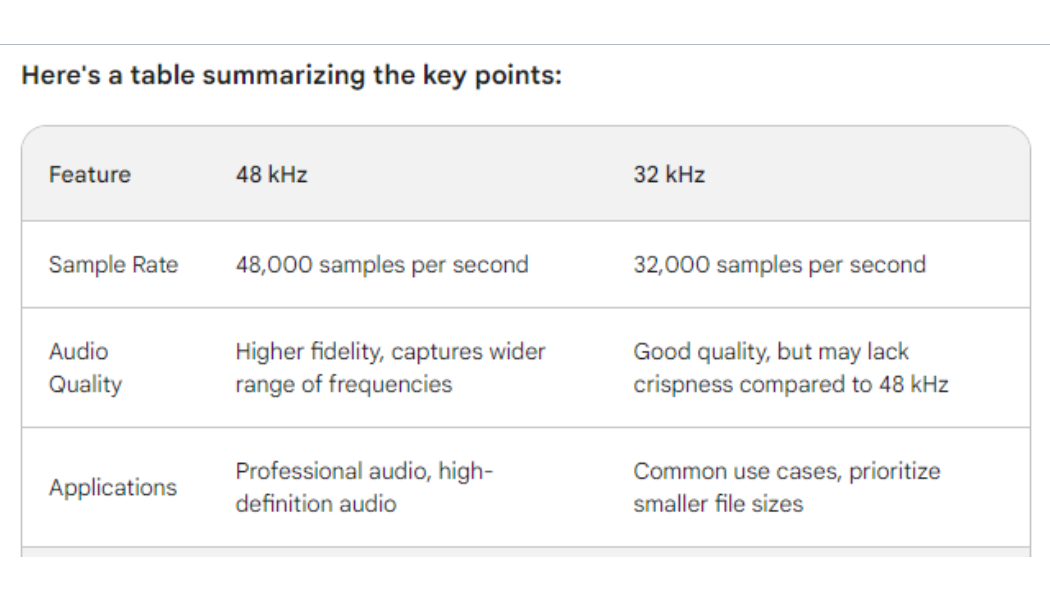
- Better Sound Quality. With neep you get higher quality sound compared to Krisp. This is because neep supports up to 48 kHz stereo audio, where Krisp only supports up to 32 kHz.
- neep enhances your audio files. Unlike Krisp, you can use neep for enhancing the sound of your audio files. So if you have recorded meetings or Podcasts for example, you can remove noise and enhance the audio with neep without having to use third party noise reduction software.
- Better Support. This is another area where neep and Krisp differ. When you choose neep as your noise reduction software, you get easy access to our U.S. based support. You can call, email, text or live chat with us Monday through Friday 7:00 a.m. to 4:00 p.m.PST. We’re located in Northern California and available to assist you with all your communications needs.
So, if you want a better sounding, more widely usable application, neep is a much better value.
Q: Is neep secure, and does it collect my personal information?
A: You can learn more about neep’s security by going here, and privacy by going here. We
realize that these are both highly important, and we want you to know that we take privacy, and
security very seriously.
Q: How does neep enhance my voice?
A: When using neep, it enhances your voice quality as well as your volume. So you sound loud,
clear, confident and consistent.
Q: Does neep support stereo audio?
A: Yes. neep supports up to 48 kHz stereo audio which gives you high-quality sound.
Q: What advantage does neep provide for improving sound quality for recorded meetings, Podcasts, or other audio projects?
A: First, neep works not only for these projects, but also for your voice and video calls making it
a more versatile solution. Secondly, neep uses an Ai powered algorithm that can filter out noise automatically. That means you don’t need to adjust any settings or presets manually. Lastly,
neep works locally on your machine with no need to upload your files to a third party server
giving you greater privacy and security.
Q: What would my callers like best about neep?
A: There are a number of things that your callers would like about you using neep. First, neep
removes the noise from both ends of the conversation. That means your callers will hear you
and not the noise going on around you. They should also like that neep also removes their noise
too. Your callers will also appreciate how neep isolates your voice from others, and enhances
the sound quality and volume. That means they’ll hear you better.
Q: Will I sound better to my callers if I use neep software?
A: Yes, you sure will. That’s because neep restores the audio signal to make your voice sound
crisper, and more natural.
Q: I use a third party app for enhancing the audio quality on my content projects. Will I need neep and this app, or will neep alone remove noise for my live calls, as well as for my recorded audio files?
A: When using neep, you won’t need a third party app for removing noise from your audio files.
neep will remove noise on your computer based voice and video calls, as well as for your audio
files.
Q: Do I have the ability to control how much noise neep removes, or is there only one level of noise control?
A: You have the ability to throttle the amount of noise reduction for both microphone, and
speakers. You can also You can also select HD voice, and echo cancellation. That puts you in
control of noise and your audio.
Q: How do I cancel my neep subscription?
visit user.neep.com and click “cancel subscription”